
Sidebar
Add your own nav items to the left sidebar, or replace it entirely through the Sidebar slot.
The left sidebar holds the header and thread list. Add a couple of your own links above the threads, or take over the whole region.
Both go through the Sidebar slot. Its children replace the sidebar's inner content, so you re-include the default pieces you want to keep. SidebarContent and SidebarSeparator are primitives you compose inside the slot, not slots themselves.
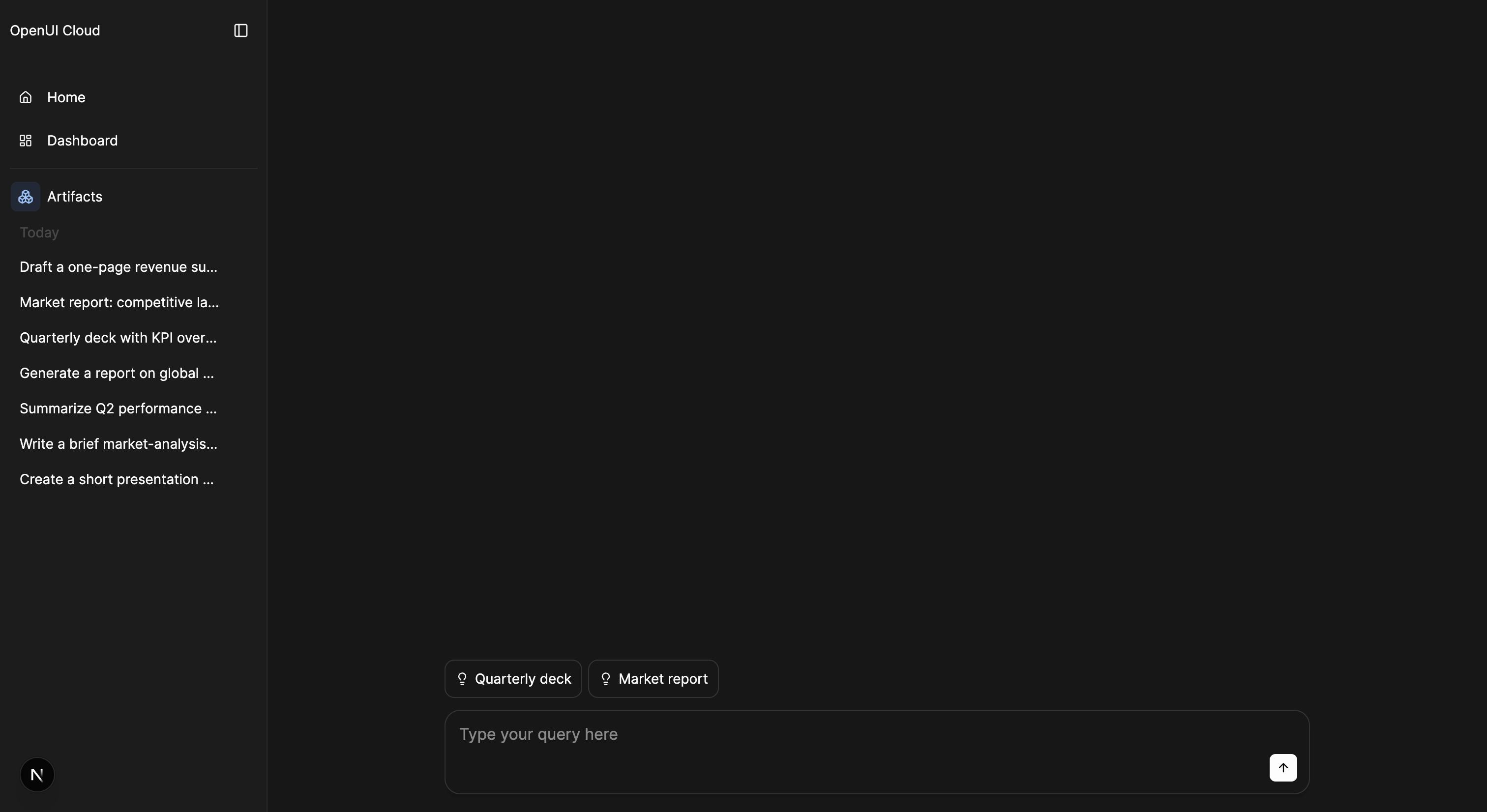
Add nav items above the thread list
The common case: a few of your own links, with the default thread list underneath. Pass children to the Sidebar slot and re-include SidebarHeader and ThreadList.
import { AgentInterface } from "@openuidev/react-ui";
import { Home, LayoutDashboard } from "lucide-react";

<AgentInterface llm={llm} storage={storage} logoUrl="/logo.svg" agentName="Acme">
  <AgentInterface.Sidebar>
    <AgentInterface.SidebarHeader />
    <AgentInterface.SidebarContent>
      <AgentInterface.SidebarItem icon={<Home size={14} />} path="home">
        Home
      </AgentInterface.SidebarItem>
      <AgentInterface.SidebarItem icon={<LayoutDashboard size={14} />} path="dashboard">
        Dashboard
      </AgentInterface.SidebarItem>

      <AgentInterface.SidebarSeparator />

      {/* keep the defaults */}
      <AgentInterface.ThreadList />
    </AgentInterface.SidebarContent>
  </AgentInterface.Sidebar>
</AgentInterface>;
A SidebarItem with path navigates. Without one, handle the click yourself via onClick. When path is set, the item highlights while its route is active, and clicking it calls the router. Your onClick runs first; call event.preventDefault() to suppress navigation.
Wire items to pages
A navigating item only changes the route. Pair it with a Route to render something there.
<AgentInterface.SidebarItem path="dashboard">Dashboard</AgentInterface.SidebarItem>

<AgentInterface.Route path="dashboard">
  <YourDashboard />
</AgentInterface.Route>
When the path matches, the route replaces the thread region; clicking a thread returns to the conversation.
Replace the whole sidebar
For full control over header placement, section order, and dividers, compose every piece yourself. Nothing default is rendered; you own the structure.
import { AgentInterface } from "@openuidev/react-ui";
import { Home, LifeBuoy } from "lucide-react";

<AgentInterface llm={llm} storage={storage} logoUrl="/logo.svg" agentName="Acme">
  <AgentInterface.Sidebar>
    <AgentInterface.SidebarHeader />
    <AgentInterface.SidebarContent>
      <AgentInterface.NewChatButton />
      <AgentInterface.SidebarSeparator />

      <AgentInterface.SidebarItem icon={<Home size={14} />} path="home">
        Home
      </AgentInterface.SidebarItem>

      <AgentInterface.ThreadList />
      <AgentInterface.SidebarSeparator />

      <AgentInterface.SidebarItem
        icon={<LifeBuoy size={14} />}
        onClick={() => window.open("https://docs.example.com", "_blank")}
      >
        Help & docs
      </AgentInterface.SidebarItem>
    </AgentInterface.SidebarContent>
  </AgentInterface.Sidebar>
</AgentInterface>;
Put SidebarHeader inside the slot, not at the top level. When you replace the sidebar, you compose the header there too. NewChatButton is not part of the default sidebar content (it lives in the mobile header), so place it yourself if you want it on desktop.