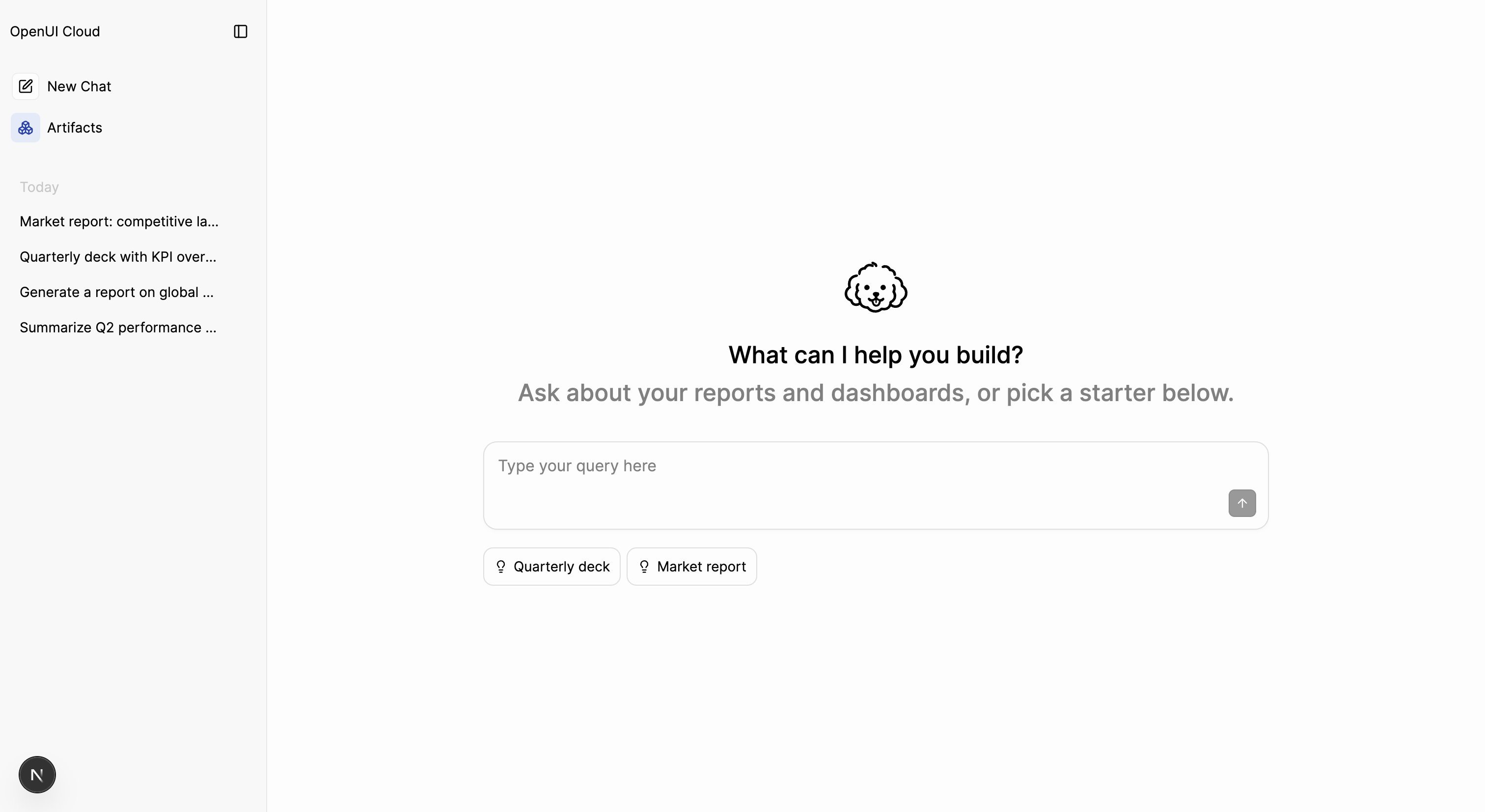
Welcome & starters
Customize the empty-state welcome screen and the conversation starters that prime a new thread.
When a thread has no messages, AgentInterface shows an empty state: a Welcome screen with conversation starters, clickable prompts that kick off the conversation. Both are configurable, from a one-line greeting to a fully custom panel. The empty state disappears once the first message lands.
Conversation starters
A starter is a clickable chip with display text and the prompt it sends. Pass an array via the starters prop:
import { AgentInterface, fetchLLM, agUIAdapter } from "@openuidev/react-ui";

const llm = fetchLLM({ url: "/api/chat", streamAdapter: agUIAdapter() });

const starters = [
  {
    displayText: "Summarize customer feedback",
    prompt: "Summarize the themes in the latest customer feedback.",
  },
  {
    displayText: "Build a revenue dashboard",
    prompt: "Build a dashboard with a bar chart of monthly revenue and a total summary card.",
  },
];

export default function App() {
  return <AgentInterface llm={llm} starters={starters} starterVariant="long" />;
}
Each entry is { displayText, prompt, icon? }. Clicking a starter sends its prompt as a user message, exactly as if the user typed it, so write prompt as a full instruction. Omit icon for a default lightbulb, pass a React node for a custom glyph, or pass <></> for none. starterVariant is "short" (compact pills) or "long" (a vertical list with icons).
starters and starterVariant set on AgentInterface flow down to the Welcome and Composer
slots. Each slot can override with its own value. Pass [] to a slot to suppress inherited
starters there.
The Welcome slot
AgentInterface.Welcome is the greeting area above the composer. Pass props to keep the default layout with your own content:
<AgentInterface llm={llm}>
  <AgentInterface.Welcome
    title="What can I help you build?"
    description="Ask about your data and dashboards, or pick a starter below."
    image={{ url: "/logo.svg" }}
    starters={starters}
    starterVariant="long"
  />
</AgentInterface>
The image prop takes { url: string } or any React node. starters set here overrides the inherited value.
Replace it entirely
Pass children to take over the whole welcome area. title, description, image, starters, and starterVariant are then ignored. A custom Welcome does not render starters for you, so to send a message from your own button, call processMessage from useThread:
import { AgentInterface, useThread } from "@openuidev/react-ui";

function Starter({ label, prompt }: { label: string; prompt: string }) {
  const processMessage = useThread((s) => s.processMessage);
  return <button onClick={() => processMessage({ role: "user", content: prompt })}>{label}</button>;
}

<AgentInterface llm={llm}>
  <AgentInterface.Welcome>
    <div className="my-welcome">
      <h1>What can I help you build?</h1>
      <Starter
        label="Build a dashboard"
        prompt="Build a revenue dashboard for the last six months."
      />
    </div>
  </AgentInterface.Welcome>
</AgentInterface>;
processMessage({ role: "user", content }) sends a user message and starts the run, the same as typing in the composer.