
Architecture
Build dashboards, CRUD interfaces, and monitoring tools. The LLM generates the UI once, then your app runs independently.
The problem today
In most AI-powered applications, when a user interacts with a generated UI (filtering data, submitting a form, refreshing a view), the request goes back through the LLM. The model re-processes the context, calls tools, and regenerates the response. Every click costs tokens. Every interaction adds latency.
How OpenUI changes this
OpenUI separates generation from execution. The LLM generates the interface once. After that, the UI runs on its own: fetching data, handling state, and responding to user actions without any LLM involvement.
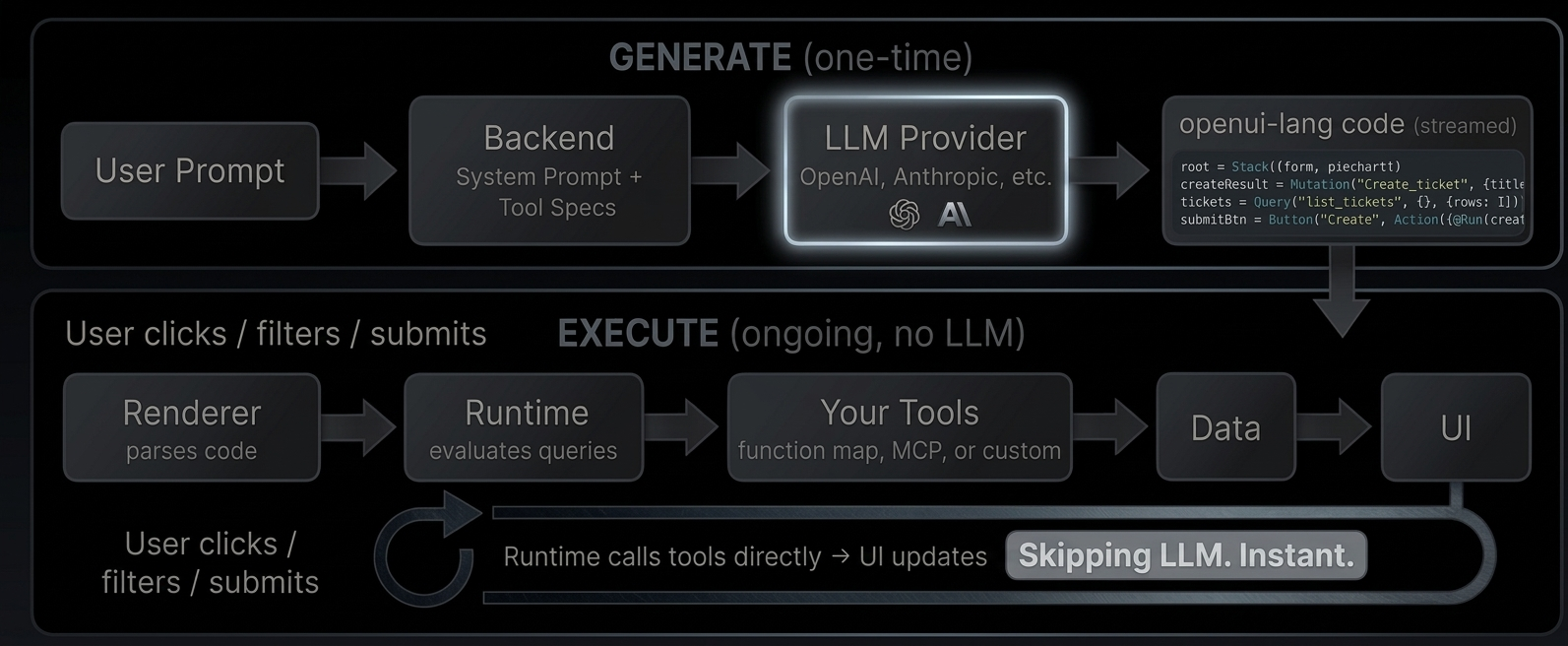
Generate
The user describes what they want. Your backend sends the request to an LLM along with a system prompt that includes your component library and tool descriptions. The LLM responds with openui-lang code, a compact declarative format that describes the UI layout, data sources, and interactions.
Execute
The Renderer parses the generated code. When it encounters a Query("list_tickets"), the runtime calls your tool directly, no LLM roundtrip. When the user clicks a button that triggers @Run(createResult), the runtime executes the mutation against your tool. When a $variable changes from a dropdown, all dependent queries re-fetch automatically.
The LLM generated the wiring. The runtime executes it.
What this enables
- Reactive dashboards with date range filters, auto-refresh, and live KPIs computed from query results
- CRUD interfaces with create forms, edit modals, tables with search and sort
- Monitoring tools with periodic refresh, server health metrics, and error rate tracking
- Any tool-connected UI. If you can expose it as a tool (via MCP or function map), the LLM can wire it into a UI
Try it live: Open the GitHub Demo
Iterate and refine
The LLM doesn't have to get it right the first time. With incremental editing, the user says "add a pie chart" and the LLM outputs only the 2-3 changed statements and the parser merges them into the existing code. Existing queries, state, and bindings stay intact.
Turn 1:                              Turn 2 (patch only):

root = Stack([header, tbl])          root = Stack([header, chart, tbl])  ← updated
header = CardHeader("Tickets")       chart = PieChart(["Open","Closed"], ← new
tickets = Query(...)                   [@Count(@Filter(..., "open")),
tbl = Table([...])                      @Count(@Filter(..., "closed"))
                                       ], "donut")
  20 lines, ~400 tokens               3 lines, ~60 tokens (85% fewer)
Connecting tools
The Renderer accepts a toolProvider prop that tells the runtime how to call your tools. Two options:
Function map, a plain object of async functions:
<Renderer
  toolProvider={{
    list_tickets: async (args) => fetch("/api/tickets").then((r) => r.json()),
    create_ticket: async (args) =>
      fetch("/api/tickets", { method: "POST", body: JSON.stringify(args) }).then((r) => r.json()),
  }}
  response={code}
  library={library}
/>
MCP client for server-side tools:
import { Client } from "@modelcontextprotocol/sdk/client/index.js";
import { StreamableHTTPClientTransport } from "@modelcontextprotocol/sdk/client/streamableHttp.js";

const client = new Client({ name: "my-app", version: "1.0.0" });
await client.connect(new StreamableHTTPClientTransport(new URL("/api/mcp")));
<Renderer toolProvider={client} response={code} library={library} />;
These examples are simplified for demonstration. In production, you'll need to handle authentication, error boundaries, and connection lifecycle.
The GitHub Demo uses a function map where tools run entirely client-side, calling the GitHub API directly from the browser. Server-side applications can expose the same tool surface through MCP.
A concrete example
Here's the full flow for a ticket tracker: define tools, generate the prompt, render the output.
1. Define your tools
// tools.ts
const tools: ToolSpec[] = [
  {
    name: "list_tickets",
    description: "List all tickets",
    inputSchema: { type: "object", properties: {} },
    outputSchema: {
      type: "object",
      properties: {
        rows: {
          type: "array",
          items: {
            type: "object",
            properties: { title: { type: "string" }, priority: { type: "string" } },
          },
        },
      },
    },
  },
  {
    name: "create_ticket",
    description: "Create a new ticket",
    inputSchema: {
      type: "object",
      properties: {
        title: { type: "string" },
        priority: { type: "string" },
      },
    },
    outputSchema: { type: "object", properties: { success: { type: "boolean" } } },
  },
];
2. Generate the prompt and call the LLM
// route.ts
import OpenAI from "openai";
import { generateSystemPrompt, type LibrarySpec } from "@openuidev/lang-core";
import componentSpec from "./generated/component-spec.json";

const gateway = new OpenAI({
  apiKey: process.env.THESYS_API_KEY,
  baseURL: "https://api.thesys.dev/v1/embed",
});

const systemPrompt = generateSystemPrompt({
  library: componentSpec as LibrarySpec,
  promptOptions: { tools, toolCalls: true, bindings: true },
});

const completion = await gateway.chat.completions.create({
  model: "openai/gpt-5",
  stream: true,
  messages: [
    { role: "system", content: systemPrompt },
    { role: "user", content: "Build a ticket tracker with a create form and table" },
  ],
});
3. Render the response
// page.tsx
<Renderer
  library={library}
  response={streamedText}
  isStreaming={isStreaming}
  toolProvider={{
    list_tickets: async () => db.query("SELECT * FROM tickets"),
    create_ticket: async (args) => db.query("INSERT INTO tickets ...", args),
  }}
/>
What the LLM generates
$title = ""
$priority = "medium"
createResult = Mutation("create_ticket", {title: $title, priority: $priority})
tickets = Query("list_tickets", {}, {rows: []})
submitBtn = Button("Create", Action([@Run(createResult), @Run(tickets), @Reset($title, $priority)]))
form = Form("create", submitBtn, [
  FormControl("Title", Input("title", $title)),
  FormControl("Priority", Select("priority", $priority, [
    SelectItem("low", "Low"), SelectItem("medium", "Medium"), SelectItem("high", "High")
  ]))
])
tbl = Table([Col("Title", tickets.rows.title), Col("Priority", tickets.rows.priority)])
root = Stack([CardHeader("Ticket Tracker"), form, tbl])
What happens at runtime
Query("list_tickets")→ runtime calls your tool → table fills with data- User types a title, picks a priority, clicks "Create"
@Run(createResult)→ runtime callscreate_ticketdirectly@Run(tickets)→ runtime re-fetcheslist_tickets→ table updates@Reset($title, $priority)→ form clears
All without the LLM.