
Quick Start
Build a Recipe Remix agent with OpenUI Gateway in about 10 minutes.
Build a Recipe Remix agent that reads your pantry, searches for real recipes, finds an image, and renders the results as interactive Generative UI.
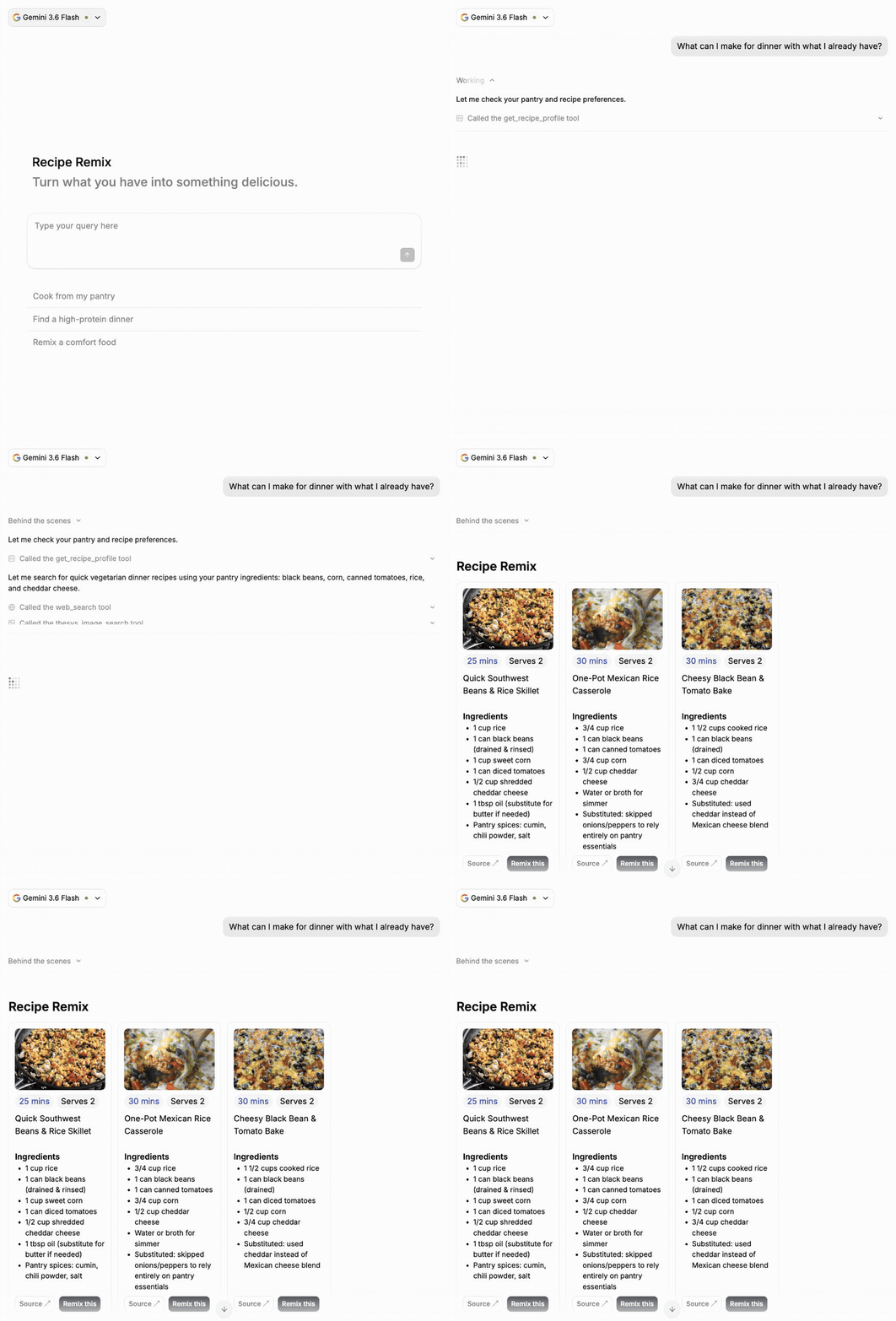
The Gateway-backed starter already includes streaming chat, conversation history, web search, image search, reports, presentations, and an example function tool. You will keep those features and add one tool and one component.
You need Node.js 20 or later.
1. Create the app
npx @openuidev/cli@latest create --name recipe-remixFollow the prompts. The CLI signs you in, creates the project, installs its
dependencies, starts the agent, and opens it in your browser. Open the generated
recipe-remix folder in your editor for the next steps.
2. Replace the starter prompts
Open src/lib/starters.tsx and replace the existing STARTERS array with:
export const STARTERS = [
  {
    displayText: "Cook from my pantry",
    prompt: "What can I make for dinner with what I already have?",
    icon: <></>,
  },
  {
    displayText: "Find a high-protein dinner",
    prompt: "What are three quick, high-protein vegetarian dinners I could make?",
    icon: <></>,
  },
  {
    displayText: "Remix a comfort food",
    prompt: "Can you give me three lighter or quicker spins on mac and cheese?",
    icon: <></>,
  },
];
Update these lines in src/components/cloud-chat.tsx:
<AgentInterface.Welcome- title="Good to see you"- description="What's on your mind today?"- promptTemplates={PROMPT_TEMPLATES}+ title="Recipe Remix"+ description="Turn what you have into something delicious." glowAnimation />This removes the general-purpose prompt templates while keeping the three recipe starters.
3. Add a pantry tool
Create src/lib/tools/get-recipe-profile.ts:
export const getRecipeProfileTool = {
  type: "function" as const,
  name: "get_recipe_profile",
  description:
    "Read the cook's pantry and recipe preferences. Call this before recommending pantry recipes.",
  parameters: {
    type: "object",
    properties: {},
    required: [],
    additionalProperties: false,
  },
  strict: true,
};

export async function executeGetRecipeProfile(): Promise<string> {
  return JSON.stringify({
    pantry: ["black beans", "corn", "canned tomatoes", "rice", "cheddar"],
    diet: "vegetarian",
    cuisine: "American",
    maxMinutes: 30,
    servings: 2,
  });
}
Change the values in executeGetRecipeProfile() to match your kitchen.
Open src/app/api/chat/route.ts and update the imports:
import { runFunctionToolLoop } from "@/lib/tool-loop";+import { executeGetRecipeProfile, getRecipeProfileTool } from "@/lib/tools/get-recipe-profile"; import { executeGetWeather, getWeatherTool } from "@/lib/tools/get-weather";Register the executor beside the existing weather tool:
const functionTools = { [getWeatherTool.name]: executeGetWeather,+ [getRecipeProfileTool.name]: executeGetRecipeProfile, };Then add its declaration to the existing tools array:
tools: [ artifactTool({ artifacts: ["slides", "report"] }) as unknown as Tool, { type: "web_search" }, { type: "image_search" } as unknown as Tool, getWeatherTool,+ getRecipeProfileTool, ],The generated route already runs the tool loop. Adding the declaration and executor is enough.
4. Add a recipe component
Create src/lib/recipe-library.tsx:
import { createLibrary, defineComponent, useTriggerAction } from "@openuidev/react-lang";
import { openuiLibrary } from "@openuidev/react-ui";
import { z } from "zod/v4";

const cardStyle = {
  display: "grid",
  gridTemplateRows: "120px auto 66px 1fr auto",
  gap: 8,
  height: "100%",
  padding: 12,
  border: "1px solid #e5e7eb",
  borderRadius: 12,
} as const;
const actionStyle = {
  padding: "5px 8px",
  borderRadius: 8,
  fontSize: 13,
  fontWeight: 600,
  textDecoration: "none",
  cursor: "pointer",
} as const;

const RecipeRemix = defineComponent({
  name: "RecipeRemix",
  description: "Three sourced recipe suggestions.",
  props: z.object({
    recipes: z.array(
      z.object({
        title: z.string(),
        time: z.string(),
        servings: z.number().int().positive(),
        ingredients: z.array(z.string()),
        sourceUrl: z.string(),
        imageUrl: z.string().optional(),
      }),
    ),
  }),
  component: function RecipeRemix({ props }) {
    const triggerAction = useTriggerAction();

    return (
      <section
        style={{
          display: "grid",
          gridTemplateColumns: "repeat(auto-fit, minmax(200px, 1fr))",
          gap: 12,
          width: "100%",
        }}
      >
        <h2 style={{ gridColumn: "1 / -1", margin: 0, fontSize: 24, fontWeight: 600 }}>
          Recipe Remix
        </h2>
        {props.recipes.map((recipe) => (
          <article key={recipe.title} style={cardStyle}>
            <div style={{ overflow: "hidden", borderRadius: 8, background: "#f3f4f6" }}>
              {recipe.imageUrl?.startsWith("https://") && (
                // eslint-disable-next-line @next/next/no-img-element
                <img
                  src={recipe.imageUrl}
                  alt={recipe.title}
                  onError={(event) => (event.currentTarget.hidden = true)}
                  style={{ display: "block", width: "100%", height: "100%", objectFit: "cover" }}
                />
              )}
            </div>
            <div style={{ display: "flex", gap: 6 }}>
              <span
                style={{
                  padding: "2px 8px",
                  borderRadius: 999,
                  background: "#eff6ff",
                  color: "#1d4ed8",
                }}
              >
                {recipe.time}
              </span>
              <span style={{ padding: "2px 8px", borderRadius: 999, background: "#f3f4f6" }}>
                Serves {recipe.servings}
              </span>
            </div>
            <h3 style={{ margin: 0 }}>{recipe.title}</h3>
            <div>
              <strong>Ingredients</strong>
              <ul style={{ margin: 0, paddingLeft: 20, fontSize: 14 }}>
                {recipe.ingredients.map((ingredient) => (
                  <li key={ingredient}>{ingredient}</li>
                ))}
              </ul>
            </div>
            <div style={{ display: "flex", alignItems: "center", gap: 8, marginTop: "auto" }}>
              <a
                href={recipe.sourceUrl}
                target="_blank"
                rel="noreferrer"
                style={{ ...actionStyle, border: "1px solid #d1d5db", color: "#111827" }}
              >
                Source ↗
              </a>
              <button
                style={{ ...actionStyle, border: 0, background: "#111827", color: "white" }}
                onClick={() => triggerAction(`Make ${recipe.title} faster and simpler`)}
              >
                Remix this
              </button>
            </div>
          </article>
        ))}
      </section>
    );
  },
});

export const recipeLibrary = createLibrary({
  root: openuiLibrary.root ?? "Stack",
  componentGroups: openuiLibrary.componentGroups,
  components: [...Object.values(openuiLibrary.components), RecipeRemix],
});
Generate the serializable component specification used by the API route:
npx @openuidev/cli@latest generate \
  --spec src/lib/recipe-library.tsx \
  --out src/lib/recipe-library-spec.json
Now update the imports in src/app/api/chat/route.ts:
import { requiredEnv } from "@/lib/env"; import { resolveRequestedModel } from "@/lib/models";+import recipeLibrarySpec from "@/lib/recipe-library-spec.json"; import { runFunctionToolLoop } from "@/lib/tool-loop";Below the imports, add:
const recipeInstructions = `
You are a practical recipe remix assistant.
Use web search before recommending recipes and include real source URLs.
Use image search to include a relevant recipe image when available.
For each recipe, set imageUrl to an HTTPS URL returned by image search when available.
Call get_recipe_profile when the user asks what they can cook from their pantry.
Use the profile's servings value for every recipe.
Return exactly three concise recipes and clearly label substitutions.
Render the final recipe recommendations using exactly one RecipeRemix component.
Do not return recipe recommendations as a prose-only response.
Never claim that a recipe is allergen-safe.
`;
Update the instructions field inside createParams:
-instructions: generateSystemPrompt({ cloud: true }),+instructions: generateSystemPrompt({+ cloud: true,+ library: recipeLibrarySpec,+ instructions: recipeInstructions,+}),Finally, update src/components/cloud-chat.tsx:
+import { recipeLibrary } from "@/lib/recipe-library";Remove the unused chatLibrary import, then update the componentLibrary prop:
-componentLibrary={chatLibrary}+componentLibrary={recipeLibrary}recipeLibrary extends the standard openuiLibrary from @openuidev/react-ui, using Stack as
its root. The standard components are available alongside RecipeRemix. Gateway's search tools
and artifact renderers also remain available. See the built-in component
libraries.
5. Try it
The agent is already running. Return to the browser and click Cook from my pantry. It should call your pantry tool, search for recipes, and render three recipe cards. Click Remix this to start a follow-up turn.