
Reactive State
Make your UI interactive with $variables that update automatically.
Every UI needs state: which tab is selected, what the user typed, whether a modal is open.
In OpenUI Lang, state is declared with $variables.
Declaring a variable
A $variable is a line that starts with $:
$days = "7"
$title = ""
$showEdit = false
That's it. The value on the right is the default.
Binding to inputs
When you pass a $variable to an input component, it creates a two-way binding.
The user changes the input, the variable updates. The variable changes, the input updates.
$days = "7"
filter = Select("days", $days, [SelectItem("7", "7 days"), SelectItem("30", "30 days")])
Using variables in expressions
Any expression can read a $variable:
title = TextContent("Showing last " + $days + " days")
data = Query("analytics", {days: $days}, {rows: []})
When $days changes (user picks "30" in the Select), the title updates and the Query
re-fetches with the new value. This happens automatically - no wiring needed.
Changing state from buttons
Use @Set inside an Action to change a variable when a button is clicked:
btn = Button("Show 30 days", Action([@Set($days, "30")]))You can set multiple variables at once:
saveBtn = Button("Save", Action([@Set($showEdit, false), @Set($saved, true)]))Resetting to defaults
@Reset restores variables to their declared defaults:
$title = ""
$priority = "medium"
resetBtn = Button("Clear", Action([@Reset($title, $priority)]))
After click: $title goes back to "", $priority goes back to "medium".
Conditional rendering
Use ternary expressions to show/hide UI based on state:
$showEdit ? editForm : null
status == "error" ? Callout("error", "Failed", errorMsg) : null
How reactivity works
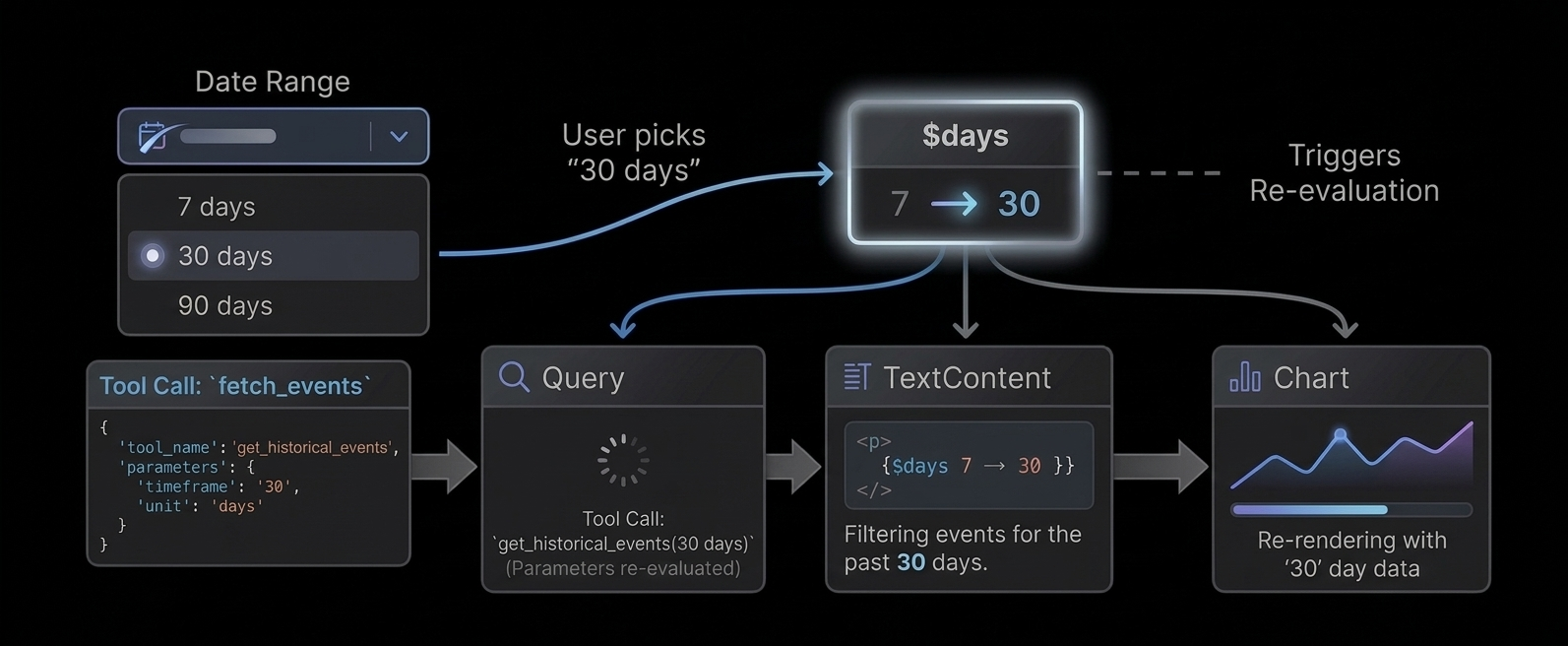
When a $variable changes:
- All inputs bound to it update their display
- All
Querycalls that reference it in their args re-fetch - All expressions that reference it re-evaluate
- The UI re-renders with new values
No event listeners. No useEffect. No wiring. Just declare and reference.