
Queries & Mutations
Fetch and write data from your tools - the LLM generates the wiring, the runtime executes it.
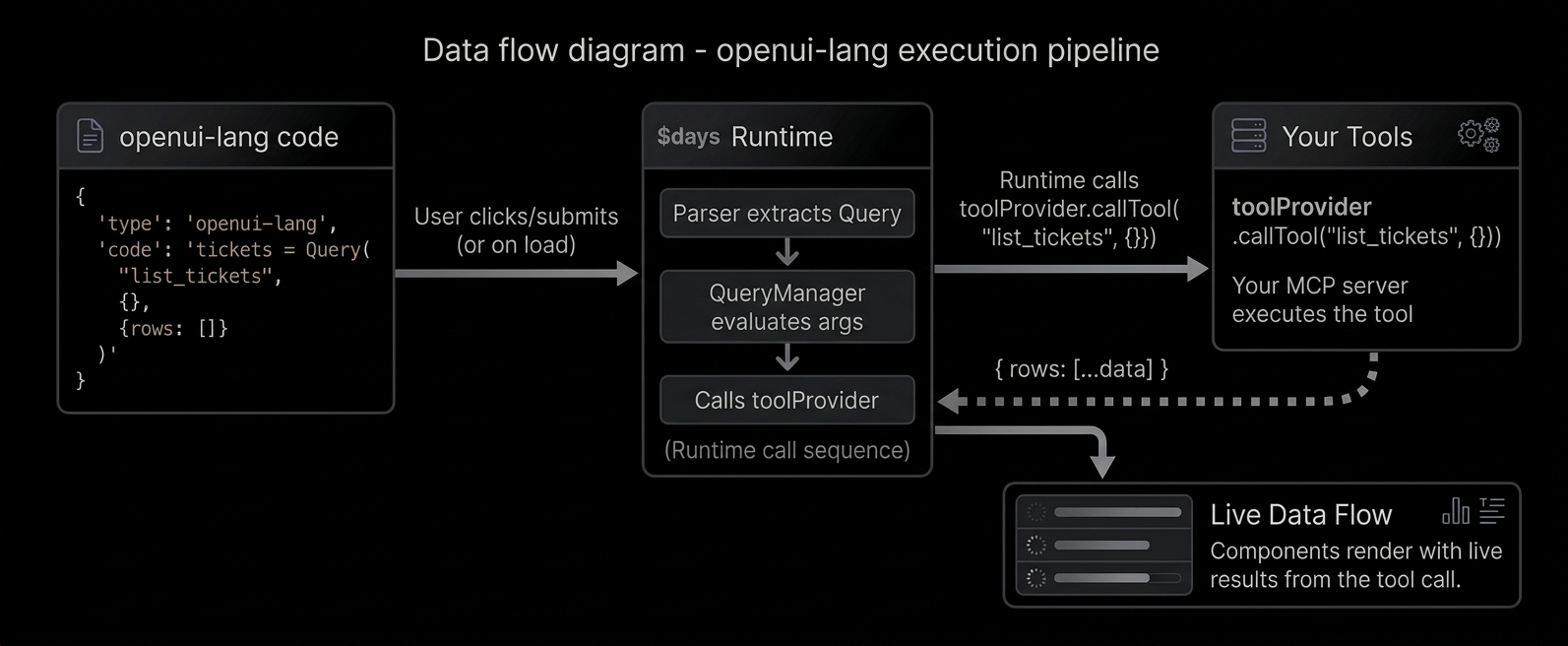
OpenUI Lang connects to your backend through tools. A tool is any function your server
exposes (a database query, an API call, a calculation). The LLM generates Query and Mutation
statements that call these tools. The runtime executes them directly and feeds the results into your UI.
Reading data with Query
data = Query("list_tickets", {}, {rows: []})What each argument means:
"list_tickets"- the tool name (matches what your server exposes){}- arguments to pass to the tool{rows: []}- default value (what renders before the tool responds)
The default value is important - it lets the UI render immediately while data loads.
Using Query results
Query results are just data. Access fields with dot notation:
tbl = Table([Col("Title", data.rows.title), Col("Status", data.rows.status)])
chart = LineChart(data.rows.day, [Series("Views", data.rows.views)])
data.rows.title extracts the title field from every row - like a column pluck.
Reactive queries
Pass a $variable in the query args - the query re-runs when the variable changes:
$days = "7"
data = Query("analytics", {days: $days}, {rows: []})
filter = Select("days", $days, [SelectItem("7", "7 days"), SelectItem("30", "30 days")])
User picks "30" → $days updates → Query re-fetches with {days: "30"} → chart updates.
Auto-refresh
Add a fourth argument for periodic refresh (in seconds):
health = Query("get_server_health", {}, {cpu: 0, memory: 0}, 30)This re-fetches every 30 seconds - great for monitoring dashboards.
Writing data with Mutation
createResult = Mutation("create_ticket", {title: $title, priority: $priority})Mutations are NOT executed on page load. They only run when triggered by @Run:
submitBtn = Button("Create", Action([@Run(createResult), @Run(tickets), @Reset($title)]))This button does three things in order:
@Run(createResult)- executes the mutation (creates the ticket)@Run(tickets)- re-fetches the tickets query (refreshes the table)@Reset($title)- clears the form
Error handling
Check result.status for mutation feedback:
createResult.status == "error" ? Callout("error", "Failed", createResult.error) : null
createResult.status == "success" ? Callout("success", "Created", "Ticket added.") : null
How tools connect to the runtime
The Renderer accepts a toolProvider prop that handles tool execution. Pass a function map or an MCP client:
// Function map
<Renderer toolProvider={{
  list_tickets: async (args) => fetch('/api/tickets').then(r => r.json()),
}} response={code} library={library} />

// Or an MCP client
<Renderer toolProvider={mcpClient} response={code} library={library} />