
Reliability
Build reliable LLM-generated interfaces by measuring, reducing, and correcting generation errors.
Generative UI turns LLM output directly into interfaces that users see and interact with. The model receives a description of the available components and their properties, then generates an interface that follows that contract. Most generations follow it correctly, but an LLM can occasionally invent a component, use an unsupported value, leave a reference unresolved, or stop before completing the interface.
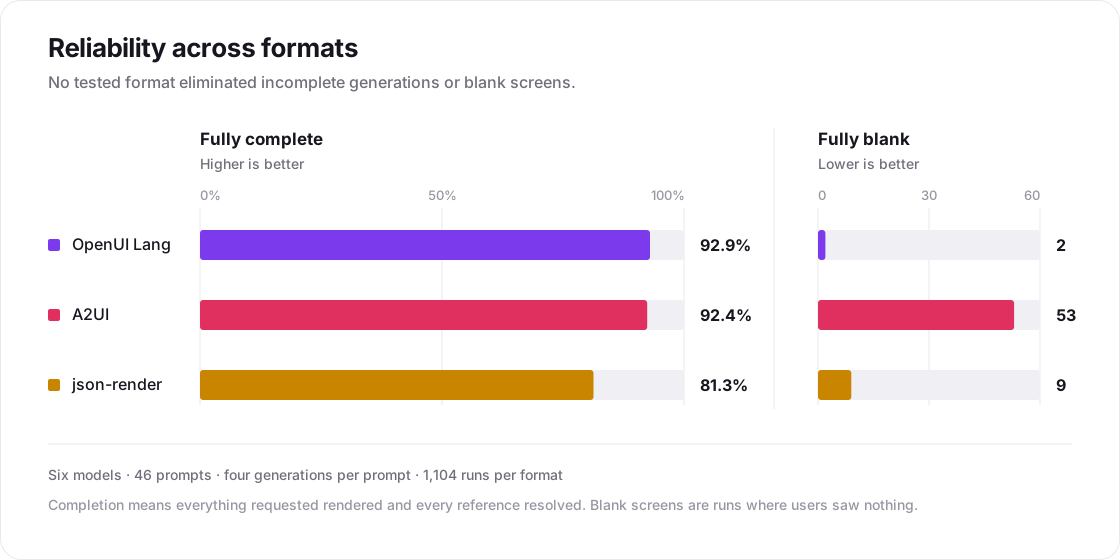
In our Reliability benchmark, every tested format, including OpenUI, A2UI, and json-render, produced incomplete generations. OpenUI completed 92.9% of the evaluated tasks and produced only 2 blank screens across 1,104 runs, but it was not error-free. Even its strongest model pairing reached 99.5%, not 100%.
Improving reliability
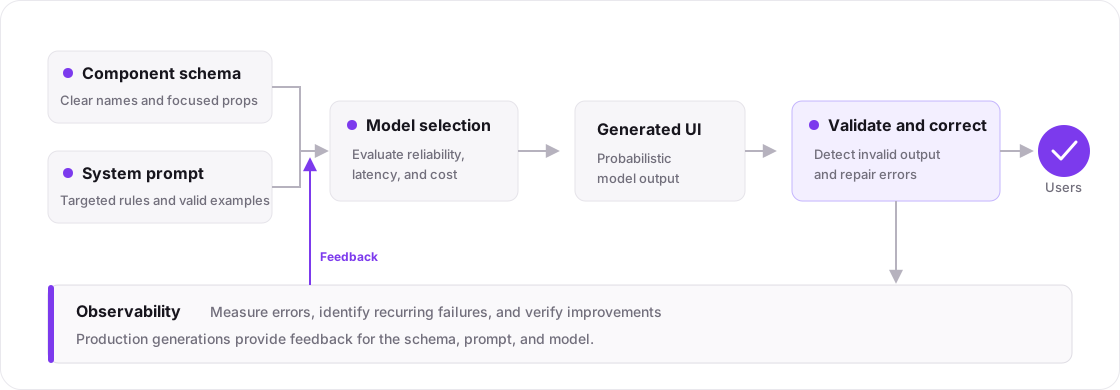
There are four main ways to improve the reliability of LLM-generated interfaces:
- Simplify the component schema. Use distinct component names, clear descriptions, focused properties, and unambiguous enum values. Remove overlapping components and group related ones with
componentGroups. See Defining Components. - Refine the system prompt. Add targeted rules for recurring errors and provide valid examples for combinations the model finds difficult. In our benchmark, a single rule improved one model's completion rate by 13 percentage points, while an incorrect example caused double-digit regressions. See System Prompts.
- Evaluate model selection. Test models using your own component library and representative prompts. Run each prompt multiple times and compare reliability alongside latency and cost.
- Validate and correct generated output. We recommend Gateway for correction during streaming, provider fallbacks, and automatic Reliability Monitoring. If you keep your existing inference setup, use Autofix to fix invalid generations.
Measure reliability before and after making these changes so you can identify the right intervention and verify that it worked.
Measure reliability
LLM generations are nondeterministic. The same model can produce different output for the same prompt, and an interface that rendered correctly once may contain errors on another attempt. Reliability therefore needs to be measured across representative prompts and repeated generations.
During development
OpenUI DevTools shows the errors captured while OpenUI parses and renders the generated interface. Each entry includes an error summary and additional details, such as the error code, affected component, or statement when available.
This helps identify failures that might otherwise be missed when the rest of the interface still renders. Test representative prompts during development and run important prompts multiple times.

Learn more in developer tools docs.
When you use @openuidev/react-lang, DevTools is automatically mounted in browser development
builds.
In production
Use Reliability Monitoring to track generation failures, identify recurring errors, and inspect the affected generations. Follow the setup guide to enable monitoring for your application.
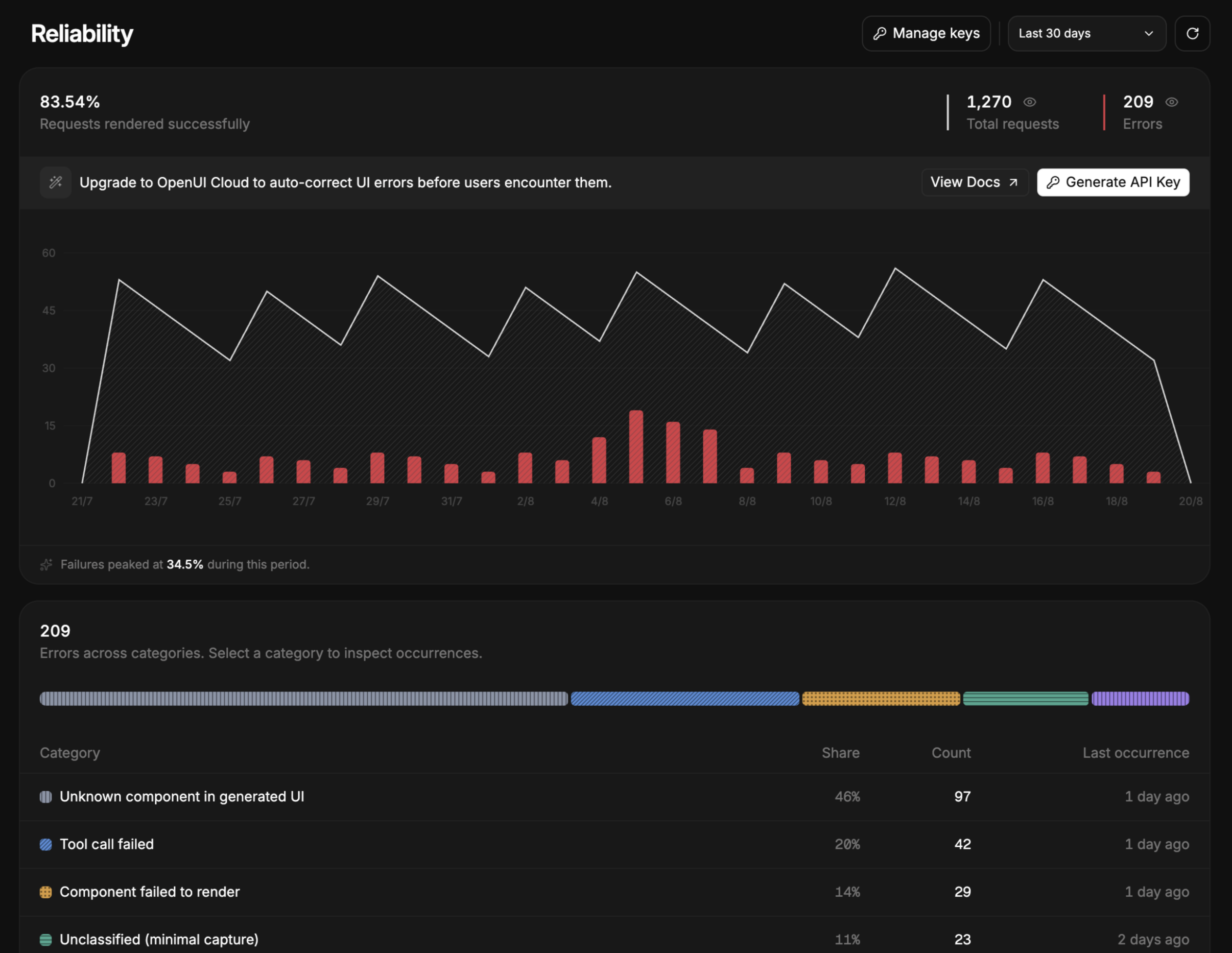
Use these findings to prioritize improvements to your component library, system prompt, and model selection.
Using a coding agent? The OpenUI skill can help your agent configure Reliability Monitoring. Install the OpenUI skill.
Production reliability
Even with a well-tuned schema, prompt, and model, some generations in production will still fail validation.
- OpenUI Gateway (recommended): correct output during streaming, recover from provider failures, and monitor generation reliability through one integration.
- Autofix API: keep your existing inference setup and send completed generations for repair. You can start by monitoring errors with the Observability SDK, but SDK instrumentation is not required to use Autofix.
OpenUI Gateway
OpenUI Gateway sits between your application and the LLM. It validates generated UI and fixes errors as it streams to your application.
For every generation, OpenUI Gateway:
- Validates generated UI as it streams.
- Fixes malformed output and schema violations on the fly.
- Recovers from model or provider failures using fallbacks.
- Tracks generation reliability automatically in Reliability Monitoring.
In production data from our Reliability benchmark, OpenUI Gateway fixed 96% of generations that initially failed validation.
Using a coding agent? The OpenUI skill can help your agent integrate OpenUI Gateway into your application. Install the OpenUI skill.
Integrations options
OpenUI Gateway provides two OpenAI-compatible APIs for this generation flow:
- Chat Completions: A drop-in endpoint for applications that already use the OpenAI Chat Completions API for generative UI.
- Responses API: Build stateful model interactions that continue from previous responses, with built-in persistence and hosted tools such as web search, image search, presentation generation, and more.
Learn more in the OpenUI Gateway documentation.
Autofix API
The Autofix API repairs OpenUI Lang after your model has generated it, so your application keeps its own model calls, keys, and prompts.
For every generation, the Autofix API:
- Validates the generation against your component library.
- Fixes unknown components, missing references, and broken structure.
- Answers with the complete fixed generation, ready to render.
import { generateSystemPrompt } from "@openuidev/lang-core";
import OpenAI from "openai";
import library from "./openui.spec.json";

const client = new OpenAI({
  apiKey: process.env.THESYS_API_KEY,
  baseURL: "https://api.thesys.dev/v1/autofix",
});

const completion = await client.chat.completions.create({
  model: "openui/autofix",
  stream: false,
  messages: [
    // Send the component-library spec in the first system turn.
    { role: "system", content: generateSystemPrompt({ cloud: true, library }) },
    ...messages,
    // The completed generation to fix is the last assistant turn.
    { role: "assistant", content: generation },
  ],
});

// completion.fix_summary.status is "already_valid", "fixed", or "fix_failed"
// completion.choices[0].message.content holds the fixed generation.
openui.spec.json is the component-library spec generated by openui generate --spec. Autofix reads it from the first system or developer message; do not pass a top-level library field. See Generate OpenUI Lang for how to generate the spec.
A generation that is already valid is free, and each fix is charged at a flat price. See the Autofix API reference for the full request and response format and the error codes.